

Managing links is one of those unglamorous tasks that quickly becomes a nightmare. If you’re a blogger or affiliate marketer, you know the pain: messy, long affiliate URLs, no way to track which blog post is actually driving clicks, and a total lack of brand control.
For years, the default solution has been a standalone SaaS tool like Rebrandly. While powerful, these tools come with a significant, recurring monthly cost that can eat into your profits. What if you could get all the core features—branded links, click tracking, and link cloaking—right inside your WordPress dashboard for a single, one-time price?
That’s the exact promise of LinkCentral, a powerful WordPress link management plugin currently available as a lifetime deal on AppSumo. In this review, we’ll dive deep to see if this $59 deal is the ultimate link-shortening solution for WordPress users.
Table of Contents
First Impressions & UI/UX
As someone who tests complex SaaS platforms daily, I brace myself for a learning curve. With LinkCentral, there wasn’t one.
It installs just like any other WordPress plugin, and from activation to creating my first branded link, it took less than 10 minutes. The entire interface lives natively within your WP-Admin sidebar. There’s no external dashboard or separate login to manage.
- Setup Time: Under 10 minutes.
- Ease of Navigation: Extremely easy. The settings are logical, and the main dashboard is self-explanatory.
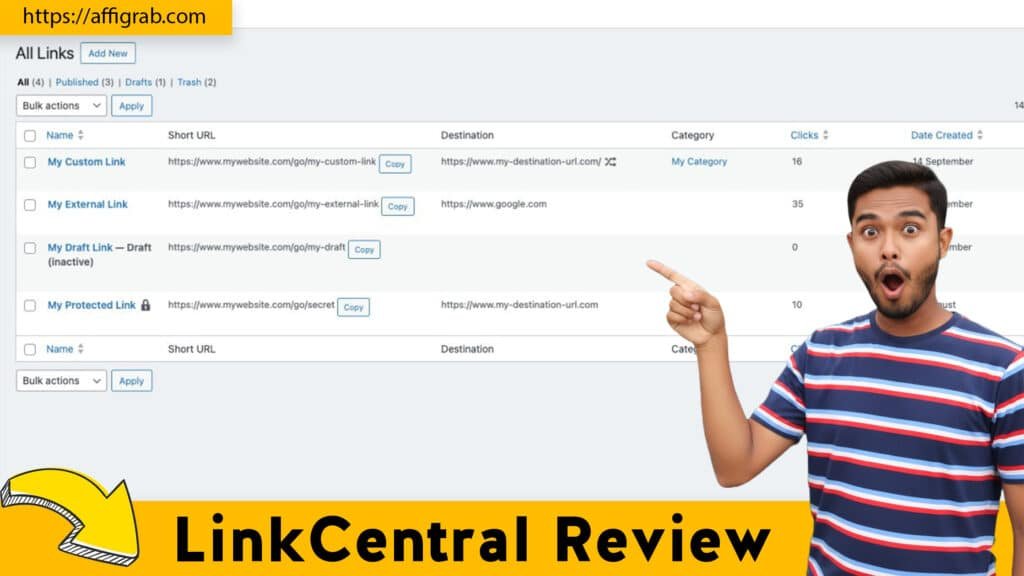
Key Design Highlight: The main LinkCentral dashboard is the star of the show. It’s incredibly clean and immediately presents all your short links, link groups, and a snapshot of click data. There’s no hunting through menus. You can see your most popular links, filter by group, and create a new link all from one central screen, which makes day-to-day management completely effortless.
Deep Dive into Core Features (Hands-On Analysis)
LinkCentral isn’t just a simple shortener; it’s a full-featured link management suite for marketers.
Feature Analysis
1. Custom Domain Link Branding: This is the most crucial feature. Instead of a generic bit.ly link, you can use your own domain (e.g., links.myblog.com/review). This instantly builds brand trust and makes your links look far more professional in emails, social media, and on your site.
2. Detailed Click Analytics & Referrer Tracking: LinkCentral tracks every click on your short links. It doesn’t just give you a total count; it provides data on the referrer (where the click came from), the user’s browser, and their operating system. This is essential for understanding your audience and optimizing your marketing.
3. Affiliate Link Managemet (Cloaking & Grouping): nThis is a massive win for affiliate marketers. You can “cloak” your ugly affiliate URLs with your clean, branded link. More importantly, you can organize links into groups. For example, you can create a “SaaS Deals” group to manage all your software affiliate links in one place.
4. UTM Parameter Builder: Right inside the link creation menu, there’s a simple builder to add UTM tags (like source, medium, and campaign) to your destination URL. This allows you to track the performance of your links with precision inside Google Analytics, all without leaving your WordPress dashboard.
🔥Check out the LinkCentral Lifetime Deal on AppSumo before it’s gone.
Mandatory: Hands-On Test Case
To put the affiliate features to the test, I simulated a common blogger scenario: promoting a Black Friday deal.
The Test: I set up a “Black Friday Deals” link group.
The Rules:
- I created a custom branded link: links.myblog.com/bf-deal.
- Using the built-in builder, I applied UTM tags to the destination URL: source=blog-banner and campaign=bf2025.
- I set the link to redirect to a specific (and very long) affiliate product URL.
The Outcome: The process was flawless. The redirect was instantaneous—no perceptible lag that you sometimes get with clunky plugins.
Analysis of Quality: I tested the link from a few different devices and browsers. Within minutes, the LinkCentral dashboard accurately populated the click data. I could see the clicks registered, and when I checked my server logs, the redirect correctly passed the UTM parameters to the final destination. This confirms it’s a reliable tool for high-stakes campaigns where every click matters.
Deal Economics and Market Comparison
Don’t have time to read? Catch the Linkcentral Review visual summary here.
This is where the LinkCentral AppSumo deal goes from “nice” to “a complete no-brainer.”
LTD Value Breakdown
- LinkCentral LTD Price: $59 (one-time payment)
- Rebrandly (Main Competitor) Price: The comparable “Pro” tier from Rebrandly costs $39 per month, which is $468 per year.
In the first year alone, you are saving $409. By Year 2, you’re $877 in profit. The LinkCentral deal includes all its pro features forever, with no recurring fees. For a tool that manages a core part of your marketing infrastructure, the value is exceptional.
Competitor Comparison: LinkCentral vs. Rebrandly
| Feature | LinkCentral (WordPress Plugin) | Rebrandly (SaaS) |
| Core Function | Link Branding & Tracking | Link Branding & Tracking |
| Platform | Natively in WordPress | Standalone SaaS (External) |
| Affiliate Cloaking | Yes | Yes |
| UTM Builder | Yes (Built-in) | Yes (Built-in) |
| Team/Workspaces | No (Designed for solo users) | Yes (Advanced features) |
| Cost | $59 (Lifetime) | $468+ per year (Recurring) |
Who is this LTD Best For?
This deal is a perfect fit for:
- WordPress-based bloggers
- Affiliate marketers
- Content creators and YouTubers who want to manage their links from their main website.
If you need robust link branding, cloaking, and solid analytics without the high recurring costs or the complex, enterprise-level team features of a full SaaS platform, LinkCentral is built for you.
Final Verdict
After a thorough hands-on test, LinkCentral proves to be a fast, reliable, and surprisingly powerful link management plugin.
Pros and Cons Table
| Pros | Cons |
| Unbeatable LTD Value: $59 forever vs. $400+/year for competitors. | WordPress-Only: This is a plugin, not a standalone SaaS. If your site isn’t on WordPress, this isn’t for you. |
| Natively in WordPress: Manage everything from your WP dashboard. No new tabs or logins. | Simpler Analytics: The analytics are excellent for 90% of users but are not as hyper-granular as Rebrandly’s enterprise tiers. |
| Excellent for Affiliates: Link cloaking and grouping are perfectly executed. | No Advanced Team Features: Lacks workspaces or granular user permissions, as it’s built for a single site admin or solo creator. |
| Extremely Simple UI: Zero learning curve. It just works. | |
| Full-Featured: Includes UTM building, custom domains, and referrer tracking. |
Final Conclusion
LinkCentral is one of the easiest “Must-Buy” recommendations I’ve made this year for a specific audience.
If you run your business on WordPress, you need a link-branding solution. The alternative is paying hundreds of dollars every year for a tool like Rebrandly. LinkCentral gives you 90% of the core features that bloggers and affiliate marketers actually need, but for a tiny one-time cost. It lives in your dashboard, it’s fast, and it reliably tracks your data.
This is a true “set it and forget it” tool that will save you money and clean up your marketing for years to come.
🔥Check out the LinkCentral Lifetime Deal on AppSumo before it’s gone.
Affiliate Disclosure: As an independent reviewer, I may receive a commission if you purchase through links in this article. This helps support my in-depth testing, and I only recommend products I believe provide genuine value.
Explore Our Pages: WP Themes, WP Plugins