

For decades, the design world has been dominated by one name: Adobe Illustrator. It’s powerful, it’s the industry standard, but it’s also notoriously complex, has a steep learning curve, and comes with a high recurring subscription cost that stings solopreneurs and small businesses every single month.
What if there was a tool that offered the core power of vector design, combined it with AI generation and instant product mockups, and wrapped it all in a simple, low-cost, all-in-one solution?
That’s the promise of Phygital+, an AI-powered design and “phygital” mockup platform currently available as a lifetime deal on AppSumo. For anyone tired of juggling multiple apps and paying endless fees, this deal demands a closer look.
Table of Contents
First Impressions & UI/UX
My first impression of Phygital+ is one of refreshing simplicity. Where Adobe Illustrator greets you with a dense constellation of menus, toolbars, and panels, Phygital+ offers a clean, modern, and intuitive dashboard. It’s clear this tool was built for speed and efficiency, not for gatekeeping features behind obscure commands.
Setup Time: Onboarding was incredibly fast. After logging in, I was able to import existing brand assets (logos, color palettes) and orient myself with the main tools in under 15 minutes.
Ease of Navigation: The user experience is exceptionally easy. The learning curve is minimal, especially for anyone who has touched a design tool like Canva or Figma before. You aren’t hunting for features; they are logically laid out.
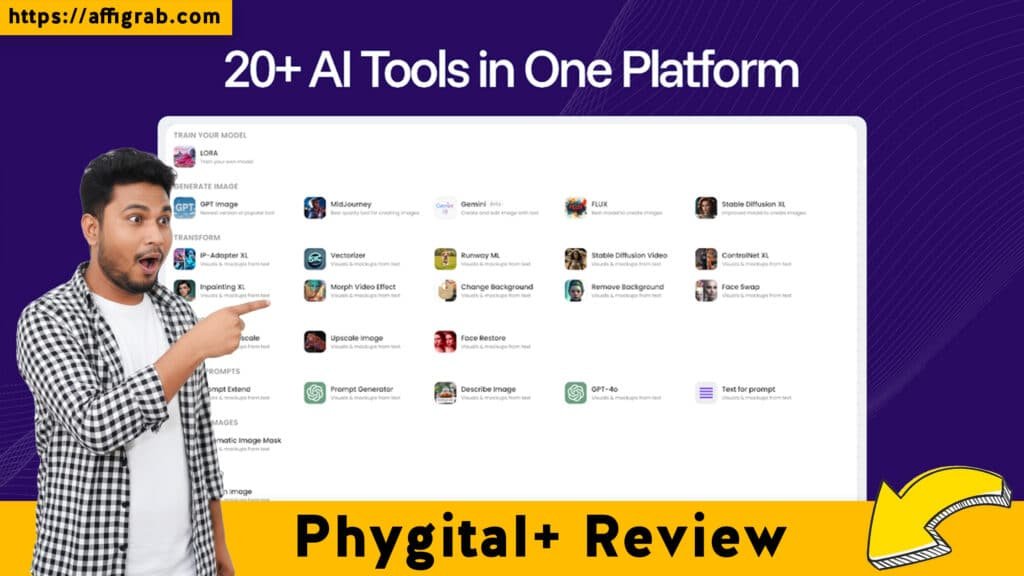
A Key Design Highlight is the seamless connection between its core components. The integrated asset library, the AI text-to-vector generator, and the design canvas all live in one unified dashboard. This cohesion is the platform’s greatest strength, as it eliminates the need to jump between different programs (like Illustrator for vectors, Photoshop for mockups) just to complete a single project.
Deep Dive into Core Features (Hands-On Analysis)
Phygital+ isn’t trying to be a 1-for-1 Illustrator clone. Instead, it focuses on the 80% of features most users actually need and adds powerful AI and mockup tools on top.
1. AI-Powered Vector Creation: This is the star of the show. Instead of drawing complex shapes manually, you can enter a text prompt (e.g., “a minimalist logo of a mountain range”) and the AI will generate a clean, fully editable SVG vector file for you.
2. Integrated “Phygital” Asset Mockups: This feature directly connects your digital designs to physical products. With a single click, you can apply your logo or artwork onto a massive library of high-resolution mockups, including t-shirts, mugs, packaging, signage, and more.
3. Cloud-Based Asset Management: The platform functions as a central hub for all your brand assets. Logos, vectors, generated images, and final mockups are all stored, tagged, and accessible from the cloud, which is a massive time-saver for teams and freelancers.
4. One-Click Social Media Resizing: Much like Canva, this tool lets you design an asset once and then instantly resize and format it for every major social media platform (e.g., Instagram Post, Story, Facebook Banner, Twitter Header).
Mandatory Hands-On Test Case: The 5-Minute Brand Asset Workflow
To test the core workflow, I invented a fictional business: a local coffee shop called “The Daily Grind.”
1. AI Logo: I used the ‘AI Vector Generator’ with the simple text prompt, “minimalist steaming coffee cup logo, line art style.”
2. Mockup Application: The AI produced a clean, professional SVG in seconds. I immediately took this vector and used the ‘Phygital Mockup’ tool to apply it to a coffee mug and a t-shirt for potential staff uniforms.
3. Social Media Blitz: Finally, I created a simple “Grand Opening” graphic using the logo and the ‘Social Media Resizer’ to generate five variations for Instagram, Facebook, and Twitter.
The result: This entire process—from idea to editable logo to product mockups to a full suite of social media assets—took under 5 minutes. This is a task that would normally require juggling Illustrator for the vector, Photoshop or Placeit for the mockups, and a separate tool like Canva for the social posts.
The quality was excellent. All generated assets were high-resolution, and the vector file was fully editable and clean, allowing for easy color changes or minor tweaks.
Deal Economics and Market Comparison
This is where the AppSumo deal truly shines.
- . LTD Value Breakdown: The Phygital+ Lifetime Deal is available for a one-time payment of $59, which includes lifetime access to all Pro features.
- Competitor Cost: Its main competitor, Adobe Illustrator (Single App plan), costs $22.99/month, which adds up to $275.88 every single year.
In your first year alone, you save $196.88. After that, you are saving $275.88 annually, forever. This isn’t just a good deal; it’s a complete shift in your business economics, eliminating a recurring subscription entirely.
See the 9 essential points of Phygital Review in our web story.
Competitor Comparison: Phygital+ vs. Adobe Illustrator
| Feature | Phygital+ | Adobe Illustrator |
|---|---|---|
| Core Vector Tools | Yes (Core 80%) | Yes (Industry Standard, 100%) |
| AI Vector Generation | Yes (Integrated) | Requires new AI features or plugins |
| Phygital Mockups | Yes (Integrated) | No (Requires Photoshop/other apps) |
| Learning Curve | Low (Minutes to Hours) | High (Weeks to Months) |
| Collaboration | Cloud-Based | Cloud-Based (Creative Cloud) |
| Cost | $59 (Lifetime) | $275.88 (Annual) |
Who is this LTD Best For?
This deal is perfect for:
- Freelancers & Solopreneurs: Who need to produce professional designs and mockups for clients quickly.
- Marketing Agencies: Who need to iterate on creative assets and social media campaigns without workflow bottlenecks.
- E-commerce Brand Owners: Who constantly need new product mockups and promotional graphics.
- mall Businesses: Who want to ditch the high subscription costs of the Adobe suite for a powerful, affordable alternative.
Final Verdict
Phygital+ is a prime example of what a modern SaaS tool should be: focused, powerful, and efficient. It understands that most users don’t need every single obscure feature; they need to get from idea to a finished, professional-grade asset as quickly as possible.
Pros and Cons Table
| Pros | Cons |
|---|---|
| Unbeatable lifetime value (zero recurring cost) | Not built for highly complex, multi-layer print production (like magazine layouts) |
| Simple, all-in-one UI streamlines the workflow | Limited advanced typography and pathfinding controls compared to Illustrator |
| Powerful AI-vector generator saves hours of work | Smaller plugin and integration ecosystem than the Adobe suite |
| Integrated “Phygital” mockups are a massive time-saver | Vector purists may miss some niche, high-end tools |
| Extremely low learning curve for fast onboarding |
Final Conclusion
Phygital+ is an undeniable Must-Buy for its target audience. It is not a complete Illustrator replacement for a high-end vector artist creating complex illustrations. However, it is a workflow replacement.
It replaces the combination of Illustrator, Photoshop, and Canva for the most common design tasks businesses face. The ability to generate a logo, put it on a product, and create social media ads for it—all from one dashboard, in minutes, for a one-time price—is simply unmatched. The $759 lifetime deal on AppSumo is one of the best value propositions in design software today.
Grab the $59 Phygital+ lifetime deal on AppSumo before it’s gone.
Disclosure: This review contains affiliate links, which means we may receive a small commission if you purchase the deal, at no extra cost to you. We only recommend products we genuinely believe provide exceptional value.
Explore Our Pages: WP Themes, WP Plugins