Repetitive typing is the silent productivity killer. Whether you are a support agent sending the same troubleshooting steps for the 100th time, or a freelancer paralyzed by “writer’s block” while drafting a difficult email, the friction is real.
For years, tools like TextExpander have been the gold standard, saving keystrokes with static snippets. But in 2025, static text isn’t enough—you need intelligence. And you definitely don’t need another monthly subscription eating into your margins.
Enter Triplo AI, a tool currently making waves on AppSumo. It promises to be the “always-available” AI layer that sits on top of your entire operating system, bringing the power of ChatGPT (and other models) into any text field you use. But is it a true replacement for established giants, or just another wrapper?

I took Triplo AI for a spin to see if this lifetime deal is the productivity unlock solopreneurs have been waiting for.
Table of Contents
First Impressions & UI/UX
Most AI tools force you into a browser tab. You have to copy your text, switch tabs to ChatGPT, paste it, wait for the result, copy it back, and finally paste it into your email. It breaks your flow.
Triplo AI solves this with its unique “Overlay” architecture.
Get the Triplo AI Lifetime Deal on AppSumo
The Triplo Bar
Once installed, the app runs quietly in the background. Pressing the activation hotkey (default: Ctrl + Space or Cmd + Space) summons the Triplo Bar—a sleek, unobtrusive search bar that appears directly over whatever window you are using.
- UI Cleanliness: The design is minimal. It doesn’t clutter your screen with floating widgets. It only appears when summoned and vanishes the moment it executes a command.
- Setup Time: Getting started was surprisingly fast. I downloaded the desktop agent (available for Mac, Windows, and Linux), logged in, and had my API key configured in under 5 minutes.
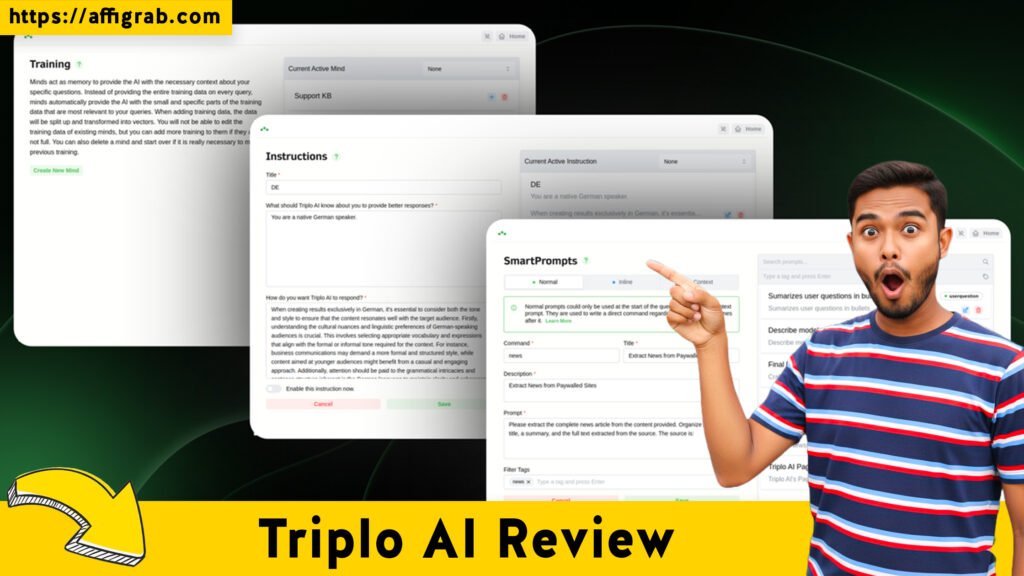
- Key Design Highlight: The SmartPrompts library is the standout feature here. Instead of memorizing obscure shortcodes (like ;email1 in TextExpander), Triplo organizes your saved prompts into a searchable command palette. You just type a keyword like “blog” or “reply,” and your saved AI instructions appear instantly.
Deep Dive into Core Features (Hands-On Analysis)
Triplo isn’t just a text expander; it’s a context expander. Here is how the core features stack up.
1. Unlimited SmartPrompts
Think of these as “macros on steroids.” A standard text expander pastes a static block of text. A SmartPrompt pastes a set of instructions for the AI to follow. You can save complex prompt engineering—like “Rewrite this in the style of David Ogilvy” or “Fix grammar and translate to Spanish”—and trigger them with a few keystrokes.
2. Context Awareness (Screen Reading)
This is the killer feature. Triplo can “see” what you have highlighted. When you trigger the bar, you can instruct it to act on the selected text. This eliminates the copy-paste dance entirely.
3. BYOK (Bring Your Own Key) & Local LLM Support
Triplo allows you to connect your own OpenAI or Anthropic API keys, meaning you pay wholesale prices for tokens rather than a marked-up subscription. Even better, it supports Local LLMs via Ollama. For privacy-focused users, this means you can run models like Llama 3 locally on your machine for free, keeping your data completely offline.
Get the Triplo AI Lifetime Deal on AppSumo
4. Universal Compatibility
Because it is an OS-level app, it works where browser extensions fail. I tested it successfully in:
- Slack (Desktop App)
- Microsoft Word
- Notion
- Chrome/Brave
- Outlook
Hands-On Test Case: The “Polite Client Rejection”
To test if Triplo could replace a human workflow, I created a specific SmartPrompt designed to handle difficult clients.
1. The Scenario: I received a demanding email from a mock client asking for “free scope creep” work that wasn’t in our contract.
2. The Test:


- I highlighted the client’s angry email text directly in my mail app.
- I hit Cmd + Space to summon Triplo.
- I typed “Reject” to find my saved “Polite Rejection” SmartPrompt.
- The Prompt Logic: “Act as an empathetic project manager. Read the selected email. Draft a reply that firmly declines the request for extra work, citing our original contract, but offers a paid add-on as a solution. Keep the tone professional and warm.”
3. The Outcome: In about 3 seconds, Triplo typed a response directly into the reply field. It correctly identified the specific request from the client’s text, referenced “the agreement we signed,” and pivoted to an upsell.
4. Analysis: The output required zero formatting fixes. Unlike a static template, the AI customized the reply to the specific details of the client’s email.
Deal Economics and Market Comparison
This is where the AppSumo Lifetime Deal (LTD) shines.
TextExpander Pricing vs. Triplo AI
- TextExpander (Business Plan): ~$10.41/month per user (billed annually).
- TextExpander (Individual): ~$4.16/month (billed annually).
- Triplo AI (Tier 1): ~$69 One-Time Payment.
The Savings Breakdown
If you switch from the TextExpander Business plan to Triplo AI:
- Year 1 Savings: You save approximately $56.
- Year 3 Savings: You save approximately $306.
Note: With Triplo, you may have small API costs if you use OpenAI, but these are often negligible for individual use (often <$2/month), or $0 if you use Local LLMs.
Comparison Table
Get the Triplo AI Lifetime Deal on AppSumo
Who is this LTD Best For?
This deal is a no-brainer for Customer Support Agents, Content Creators, and Freelancers who are tired of monthly subscriptions and want the flexibility of AI generation directly inside their workflow.
Final Verdict
Triplo AI is not just a cheaper TextExpander; it is an evolution of the concept. While it lacks some of the team-sharing granularity of enterprise text expanders, it makes up for it with raw creative power.
Pros and Cons
Conclusion
If you are looking for a way to integrate AI into your daily typing without constant context switching, Triplo AI is a Must-Buy. It effectively bridges the gap between a simple clipboard manager and a full AI assistant.
For the price of a few months of TextExpander, you get a lifetime of intelligent, context-aware writing assistance that you can use anywhere on your computer.
Get the Triplo AI Lifetime Deal on AppSumo
(Note: This is an affiliate link. I may receive a commission at no extra cost to you if you purchase through this link.)
Disclaimer: Deal terms and pricing are subject to change by AppSumo and the vendor at any time. Please verify all details on the deal page before purchasing.
Explore Our Pages: WP Themes, WP Plugins, Blog